Science
The “Invisible” Interface: Applying Cognitive Load Theory to UX and Learning Experience Design
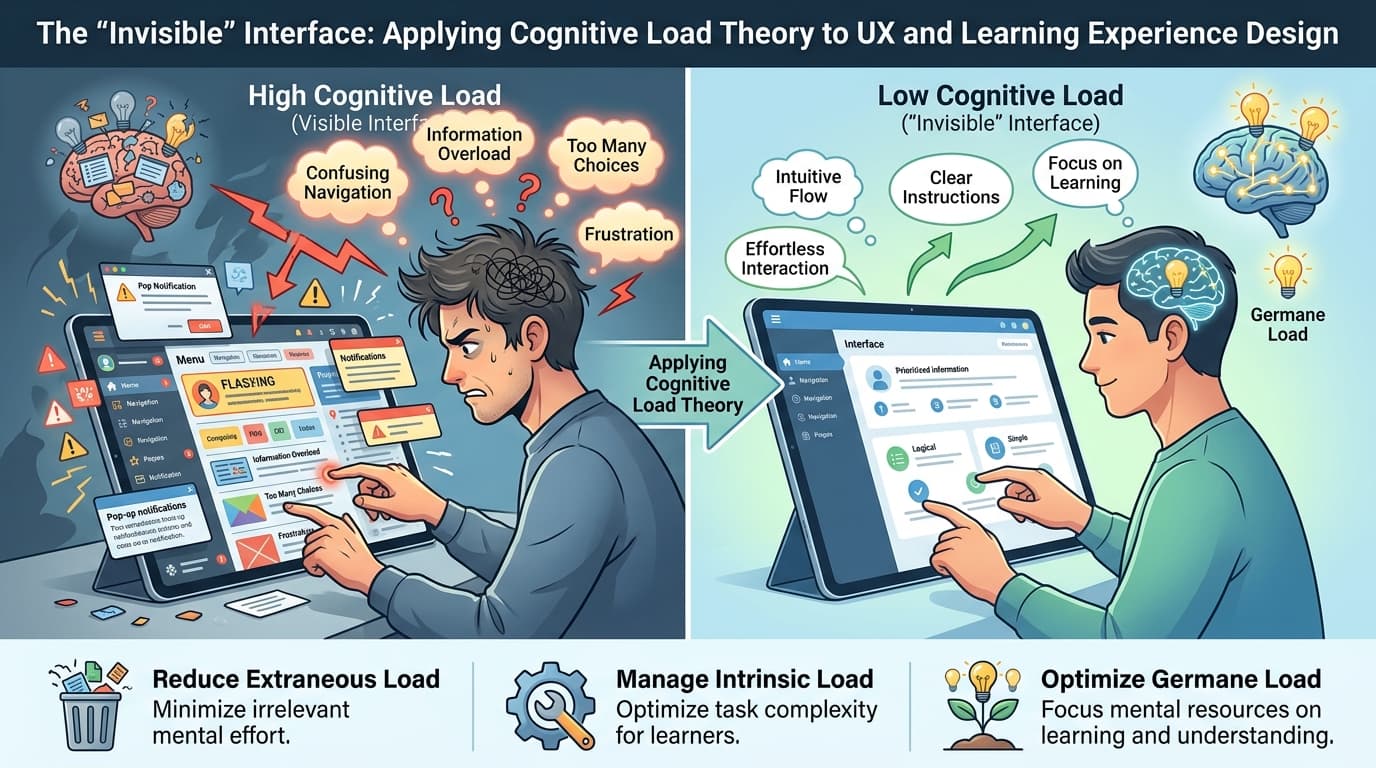
In the evolving intersection of educational technology (EdTech) and human–computer interaction (HCI), a quiet but powerful idea is gaining traction: the best interface is one you barely notice. This “invisible interface” does not demand attention—it facilitates cognition. It supports learning by aligning with how the human mind processes information. At the centre of this paradigm lies cognitivism, and more specifically, cognitive load theory (CLT).
As digital learning environments become more complex, the role of Learning Experience Designers (LXDs) and UX practitioners is no longer just to make systems usable, but to make them cognitively efficient. This article explores how cognitive load theory—grounded in the science of human memory—can be operationalized in UX and LXD to reduce “mental bottlenecking” and enable meaningful learning.
Every interface choice either reduces or adds cognitive demand. In this way, UX decisions directly influence the learner’s ability to engage in higher-order thinking.
Cognitivism: Learning as Information Processing
Cognitivism represents a shift from behaviorist models of learning toward an emphasis on internal mental processes. Rather than focusing solely on observable behavior, cognitivism investigates how learners perceive, process, store, and retrieve information. It positions the learner as an active participant in constructing knowledge through mental operations such as attention, encoding, and problem-solving.
This theoretical orientation aligns closely with modern digital learning environments. When learners interact with interfaces—learning management systems (LMS), educational apps, or dashboards—they are not merely clicking buttons. They are interpreting symbols, organizing information, and integrating new knowledge with existing schemas.
Thus, designing for learning is fundamentally about designing for cognition.
Cognitive Load Theory: The Architecture of Mental Effort
Cognitive load theory, developed by researchers such as John Sweller, builds on our understanding of human cognitive architecture—particularly the relationship between working memory and long-term memory (Sweller 1988).
Working memory is limited in both capacity and duration. Classic research by George A. Miller suggests that individuals can hold approximately 7 ± 2 chunks of information at a time, though more recent work narrows this to about 2–4 elements during active processing. Additionally, working memory retains information for roughly 20 seconds unless actively rehearsed. While Miller initially proposed 7 ± 2 items for short-term memory, recent research suggests that active processing is usually limited to 2–4 chunks at a time (Paas & Sweller, 2012)
While cognitive load theory provides a powerful framework, it has been critiqued for focusing heavily on individual cognition while underrepresenting social and contextual dimensions of learning (Paas & Sweller, 2012).
However, it is important to note that much of the empirical evidence supporting cognitive load theory comes from controlled laboratory settings. Real-world EdTech environments are often more complex, involving multiple tools, distractions, and social interactions, which may influence how cognitive load is experienced.
Cognitive load theory categorizes mental effort into three types:
1. Intrinsic Cognitive Load
This is the inherent difficulty associated with the material itself. For example, learning calculus naturally requires more cognitive effort than memorizing vocabulary. Intrinsic load cannot be eliminated but can be managed through sequencing and scaffolding.
2. Extraneous Cognitive Load
This refers to the mental effort imposed by how information is presented rather than the content itself. Poor interface design—cluttered layouts, confusing navigation, redundant instructions—adds unnecessary strain on working memory.
3. Germane Cognitive Load
This is the productive cognitive effort devoted to constructing and refining mental schemas. Effective instructional design aims to maximize germane load while minimizing extraneous load.
In UX terms, cognitive load can be understood as the “mental bandwidth” required to interact with a system. When that bandwidth is exceeded, users experience confusion, fatigue, and ultimately disengagement (Norman, 2013).
Understanding these distinctions is essential for designing interfaces that support rather than hinder learning.
These principles form the foundation for applying cognitive science directly to interface design.
This suggests that effective interface design is not simply about reducing effort, but about directing cognitive effort toward meaningful learning.
While minimizing extraneous load is essential, over-simplification may unintentionally constrain learners’ exploratory and creative thinking.
Expertise Reversal Effect
An important nuance within cognitive load theory is the variability of its effects across different levels of learner expertise. Research has identified the “expertise reversal effect,” a phenomenon known as the expertise reversal effect (Kalyuga, 2007), where instructional strategies that benefit novice learners may become ineffective—or even counterproductive—for more experienced individuals. For example, highly guided interfaces and simplified instructions can reduce cognitive load for beginners but may restrict deeper processing for advanced learners by limiting opportunities for exploration and problem-solving. This highlights the importance of adaptive design in learning environments, where interfaces dynamically adjust to the user’s level of expertise, ensuring that cognitive load is optimized rather than uniformly minimized.
The Problem: Cognitive Bottlenecks in Digital Learning
In EdTech environments, poorly designed interfaces often become barriers to learning rather than enablers. Students may sometimes struggle not because the content itself is inherently difficult, but because the interface consumes cognitive resources that should be reserved for learning. However, this experience can vary depending on factors such as prior knowledge, motivation, and attention.
Examples include:
• Navigating multiple tabs to find assignments
• Interpreting inconsistent iconography
• Processing dense blocks of unstructured text
• Switching between disconnected tools to complete a task
These are classic cases of extraneous cognitive load. From an HCI perspective, such inefficiencies reflect failures to apply user-centered design principles. From a learning science perspective, they represent a misalignment with human cognitive architecture.
As noted in HCI literature, users often develop workarounds when systems fail them. These improvisations—copy-pasting between tools, maintaining external notes, or avoiding features altogether—are signals of cognitive friction.
The Invisible Interface: Designing for Cognitive Efficiency
Building on these cognitive principles, the concept of the “invisible interface” focuses on reducing unnecessary mental effort while preserving capacity for meaningful learning.
An “invisible interface” is not literally invisible—it is cognitively unobtrusive. It allows users to focus entirely on their goals without being distracted by the mechanics of the system.
Achieving this requires a deliberate application of cognitive load principles in UX and LXD.
Reduce Extraneous Load
The primary goal in interface design should be to eliminate unnecessary mental effort. This includes:
• Removing redundant information
• Simplifying navigation structures
• Using consistent visual hierarchies
• Avoiding decorative elements that do not support learning
For instance, a cluttered dashboard with multiple competing elements forces users to divide attention, increasing cognitive load. A streamlined layout, by contrast, directs attention efficiently.
The effectiveness of cognitive load reduction strategies is not universal. For expert learners, overly simplified interfaces may reduce opportunities for productive cognitive engagement.
HOTS (Higher-Order Thinking Skills)
Higher-order thinking skills (HOTS), as conceptualized in Bloom's Taxonomy (Bloom,1956), encompass advanced cognitive processes such as analysis, evaluation, and creation. While cognitive load theory primarily addresses the efficiency of information processing, its implications extend directly to the cultivation of these higher-order capacities. When extraneous cognitive load is high, working memory resources are consumed by interface navigation and interpretation rather than meaningful learning. As a result, learners may remain confined to lower-order tasks such as recall and comprehension. In contrast, interfaces that minimize unnecessary cognitive burden create the conditions necessary for deeper engagement, enabling learners to critically analyze information, evaluate alternatives, and generate new knowledge. Thus, effective UX design in educational contexts is not merely about usability—it is foundational to enabling higher-order cognition.
Critical Perspective on Cognitive Load Theory
Despite its strong empirical foundation, cognitive load theory has not been without criticism. Some researchers argue that cognitive load theory focuses mainly on individual thinking and may overlook the social and contextual aspects of learning. In digital environments, learning often happens through collaboration, supported by tools, peers, and cultural context. In such cases, cognitive load cannot be understood solely as an internal phenomenon but must also be considered as distributed across systems and interactions. Therefore, while cognitive load theory provides valuable guidance for minimizing unnecessary mental effort, it should be applied alongside complementary frameworks that account for the socially situated nature of learning.
While cognitive load theory provides a strong foundation for interface design, other learning theories such as constructivism and sociocultural approaches emphasize social interaction and context. This reminds us that learning is not only an individual cognitive process but also shaped by collaboration, culture, and the environment.
Learners differ in prior knowledge, motivation, and attention. What may be a manageable cognitive load for one student could overwhelm another. Adaptive interfaces that respond to these differences can help ensure equitable learning experiences.
Miller’s Law in Design: Respecting Working Memory
Miller’s Law provides a practical guideline for managing information complexity. If users can only hold a limited number of items in working memory, interfaces must be designed accordingly.
Chunking Information
Chunking involves grouping related information into meaningful units. This reduces the number of elements users must process simultaneously.
Examples:
• Breaking a long lesson into modules
• Grouping related controls in a toolbar
• Using bullet points instead of dense paragraphs
Chunking is not just a visual strategy—it is a cognitive one. It aligns interface structure with how the brain organizes information.
As discussed earlier, reducing cognitive load through chunking helps preserve working memory capacity for higher-order thinking processes.
Therefore, effective UX in EdTech must not only minimize unnecessary cognitive demand but also ensure that effort is directed toward meaningful learning. Reducing cognitive load is not only about information structure—it also extends to how learners make decisions within the interface.
Simplifying Choices
Decision-making also consumes cognitive resources. Presenting too many options at once can lead to decision fatigue.
Effective strategies include:
• Progressive disclosure (revealing information as needed)
• Limiting menu options
• Using defaults to guide user behavior
In learning environments, this might mean presenting one task at a time rather than overwhelming students with an entire course structure upfront.
Structuring for Recall
Grouping related items improves both navigation and memory retrieval. For example:
• Categorizing course materials by topic
• Using consistent labeling conventions
• Aligning visual layout with conceptual structure
These strategies support schema formation, enhancing germane cognitive load.
Bridging HCI and LXD: A Cognitive Approach
Historically, instructional design and HCI have evolved as separate disciplines. Instructional design focused on pedagogical theory, while HCI emphasized usability and interaction.
Learning Experience Design (LXD) emerges as a bridge between these domains. It integrates:
• Learning theory (e.g., cognitivism, constructivism)
• UX methodologies (e.g., usability testing, user journeys)
• Technological affordances
However, as recent research suggests, LXD still lacks strong theoretical grounding. Cognitive load theory offers a unifying framework that connects mental processes with interface design decisions.
By grounding UX decisions in cognitive science, LXDs can move beyond intuition toward evidence-based design.
From a human–computer interaction perspective, usability is often framed in terms of efficiency, effectiveness, and satisfaction. However, in educational contexts, these metrics alone are insufficient. An interface may be efficient yet pedagogically shallow, enabling task completion without fostering meaningful learning. This raises a critical distinction between interaction efficiency and cognitive value. This means that learning experience design needs to go beyond traditional usability and consider how interactions actually support understanding. In this sense, UX decisions are not neutral; they actively shape the depth and quality of learning that can occur within a system.
Practical Takeaway: A Cognitive Friction Audit Checklist
To operationalise these principles, LXDs can evaluate digital platforms using the following checklist:
1. Information Load
• Is content broken into manageable chunks?
• Are users required to process too many elements at once?
2. Navigation Clarity
• Can users find key information within 1–2 steps?
• Are navigation patterns consistent across the platform?
3. Visual Hierarchy
• Does the interface guide effectively?
• Are important elements visually distinguishable?
4. Redundancy and Noise
• Are there unnecessary instructions or duplicate elements?
• Do visual elements support or distract from learning goals?
5. Task Flow
• Are tasks presented in a logical sequence?
• Is cognitive effort aligned with learning objectives rather than interface mechanics?
6. Memory Support
• Does the system reduce the need for users to remember information (e.g., through cues, labels, or history)?
• Are instructions visible when needed rather than requiring recall?
7. Tool Integration
• Are users forced to switch between multiple platforms?
• Can tasks be completed within a single coherent environment?
This checklist helps identify sources of unnecessary cognitive demand—points where mental effort is wasted rather than used productively.
By auditing these sources of cognitive friction, designers protect learners’ mental bandwidth for meaningful learning.
Implications for EdTech Design
As digital learning continues to expand, the stakes of cognitive design are increasing. Poor UX is no longer just an inconvenience; it is a barrier to learning equity.
Key implications include:
1. Designing for Mental Constraints
Unlike computers, human cognitive capacity cannot be upgraded. Interfaces must adapt to the learner—not the other way around.
2. Aligning UX with Pedagogy
Interface design should support instructional goals. For example, scaffolding in pedagogy should be mirrored in interface structure.
3. Evaluating Beyond Usability
Traditional usability metrics (e.g., task completion time) are insufficient. Designers must also consider cognitive load and learning outcomes.
4. Embracing Interdisciplinary Practice
Effective LXD requires collaboration between psychologists, educators, and designers. Cognitive science should inform design decisions at every stage.
Conclusion: Designing for the Mind, Not Just the Screen
The concept of the “invisible interface” ultimately reflects a deeper design philosophy—one that prioritizes alignment between technological systems and human cognition. While cognitive load theory offers a strong foundation for reducing unnecessary mental effort, its true value lies in enabling learners to engage in higher-order thinking. At the same time, a critical perspective reminds us that cognition does not occur in isolation but is shaped by social, contextual, and technological factors. For learning experience designers, this necessitates a balanced approach: one that minimizes cognitive friction while preserving the complexity required for meaningful learning. In bridging cognitive science and human–computer interaction, the goal is not merely to make interfaces easier to use, but to make them more intellectually empowering.
References
- Anderson, J. R. (1990). Cognitive psychology and its implications (3rd ed.). W. H. Freeman.
- Anderson, L. W., & Krathwohl, D. R. (Eds.). (2001). A taxonomy for learning, teaching, and assessing: A revision of Bloom’s taxonomy of educational objectives. Longman.
- Bloom, B. S. (1956). Taxonomy of educational objectives: The classification of educational goals. Handbook I: Cognitive domain. David McKay.
- Bruner, J. S. (1966). Toward a theory of instruction. Harvard University Press.
- Georgiou, Y., & Ioannou, A. (2021). Learning experience design with immersive virtual reality in physics education. Educational Technology Research and Development, 69(6), 3051–3080. https://doi.org/10.1007/s11423-021-10018-9
- Grudin, J. (1988). Why CSCW applications fail: Problems in the design and evaluation of organizational interfaces. In Proceedings of the 1988 ACM conference on Computer-supported cooperative work (pp. 85–93). ACM. https://doi.org/10.1145/62266.62273
- Hassenzahl, M. (2013). User experience and experience design. In M. Soegaard & R. F. Dam (Eds.), The encyclopedia of human-computer interaction (2nd ed., pp. 1–14). Interaction Design Foundation.
- Kilgore, W. (2016). Human-centered design in instructional contexts. (No verified publication found—needs clarification).
- Miller, G. A. (1956). The magical number seven, plus or minus two: Some limits on our capacity for processing information. Psychological Review, 63(2), 81–97. https://doi.org/10.1037/h0043158
- Newell, A., & Simon, H. A. (1972). Human problem solving. Prentice-Hall.
- Norman, D. A. (2013). The design of everyday things (Revised & expanded ed.). Basic Books.
- Orlikowski, W. J. (1996). Improvising organizational transformation over time: A situated change perspective. Information Systems Research, 7(1), 63–92. https://doi.org/10.1287/isre.7.1.63
- Paas, F., & Sweller, J. (2012). An evolutionary upgrade of cognitive load theory. Educational Psychology Review, 24(1), 27–45. https://doi.org/10.1007/s10648-011-9179-2
- Schmidt, M., & Huang, R. (2022). Defining learning experience design: Voices from the field of learning design & technology. TechTrends, 66(2), 141–158. https://doi.org/10.1007/s11528-021-00656-4
- Schmidt, M., Earnshaw, Y., Tawfik, A. A., & Jahnke, I. (2020). Learner and user experience research: An introduction for the field of learning design & technology. EdTech Books.
- Straub, E. T. (2009). Understanding technology adoption: Theory and future directions for informal learning. Review of Educational Research, 79(2), 625–649. https://doi.org/10.3102/0034654308325896
- Sweller, J. (1988). Cognitive load during problem solving: Effects on learning. Cognitive Science, 12(2), 257–285. https://doi.org/10.1207/s15516709cog1202_4
- Sweller, J., Ayres, P., & Kalyuga, S. (2011). Cognitive load theory. Springer. https://doi.org/10.1007/978-1-4419-8126-4
- Sweller, J., van Merriënboer, J. J. G., & Paas, F. G. W. C. (1998). Cognitive architecture and instructional design. Educational Psychology Review, 10(3), 251–296. https://doi.org/10.1023/A:1022193728205
Test Your Knowledge!
Click the button below to generate an AI-powered quiz based on this article.
Did you enjoy this article?
Show your appreciation by giving it a like!
Conversation (0)
Cite This Article
Generating...