Technology
What is Caching? - The Foundation of Performance
Building an application that works for ten users is easy. Building one that works for ten million is where the real engineering begins. When you hear about a site "crashing" due to high traffic, it's usually because one of these three pillars, Caching, Load Balancing, or Scaling was either missing or poorly configured.
For university students and aspiring backend engineers, these aren't just buzzwordsthey are the tools that keep the internet from breaking under its own weight.
1. Caching - The Art of Remembering
Imagine you are studying for an exam. Every time you need a fact, you could walk across campus to the library, find the book, and read the page. That is slow. Or, you could just write that fact on a sticky note and put it on your desk. Caching is that sticky note. It is the process of storing copies of data in a temporary storage location (a cache) so that future requests for that data can be served faster.
- Browser Caching - Your browser saves images and scripts so it doesn't have to download them every time you refresh.
- CDN (Content Delivery Network) - Copies of your website are stored on servers all over the world, closer to the users.
- Server-Side Caching - Using tools like Redis or Memcached to store the results of expensive database queries in RAM.
The Golden Rule - The fastest request is the one you never have to make to the database.
2. Load Balancing - The Ultimate Traffic Cop
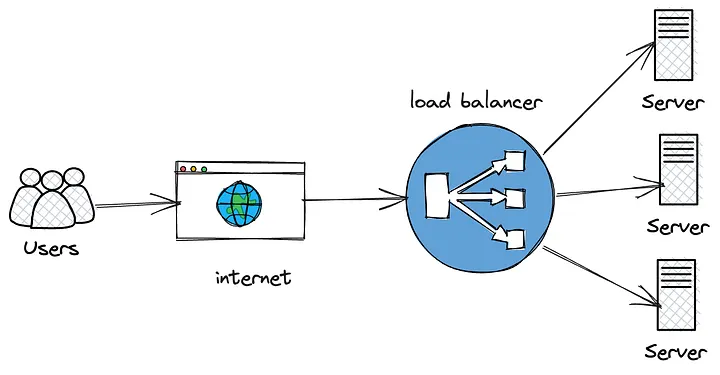
If you have a massive influx of users, even the most powerful server will eventually catch fire. To prevent this, we use multiple servers. But how do you decide which user goes to which server? Enter the Load Balancer. This is a piece of software or hardware that sits in front of your servers and distributes incoming network traffic across them.
Common Strategies
- Round Robin - Requests are sent to servers in order (Server A, then B, then C).
- Least Connections - The request goes to whichever server is currently the least busy.
- IP Hash - The user's IP address determines which server they get, ensuring they always go to the same one (useful for session persistence).
3. Scaling - Growing the System
Scaling is the strategy of increasing the capacity of your system to handle more load. There are two primary ways to do this,
Vertical Scaling (Scaling Up) This means adding more power (CPU, RAM, SSD) to your existing server.
- Pros - Easy to implement, no architectural changes needed.
- Cons - There is a hard limit to how powerful a single machine can be, and it creates a single point of failure.
Horizontal Scaling (Scaling Out) This means adding more servers to your pool. This is the modern standard for cloud-native applications.
- Pros - Theoretically infinite growth; high availability (if one server dies, others take over).
- Cons - Requires a load balancer and a more complex "stateless" architecture.
Conclusion - The Synergy
In a production environment, these three concepts work together in a beautiful loop
- Cache as much as possible to reduce the work.
- Scale Horizontally by adding more servers when the cache isn't enough.
- Load Balance the traffic across those new servers so they stay healthy.
Mastering this trio is what separates a "coder" from a "System Architect." As you build your university projects, try to think, "If a thousand people used this right now, where would it break?" That question is the beginning of great engineering.
Test Your Knowledge!
Click the button below to generate an AI-powered quiz based on this article.
Did you enjoy this article?
Show your appreciation by giving it a like!
Conversation (0)
Cite This Article
Generating...