Technology
The Ultimate Beginner's Guide to Windows Activation: Everything You Need to Know
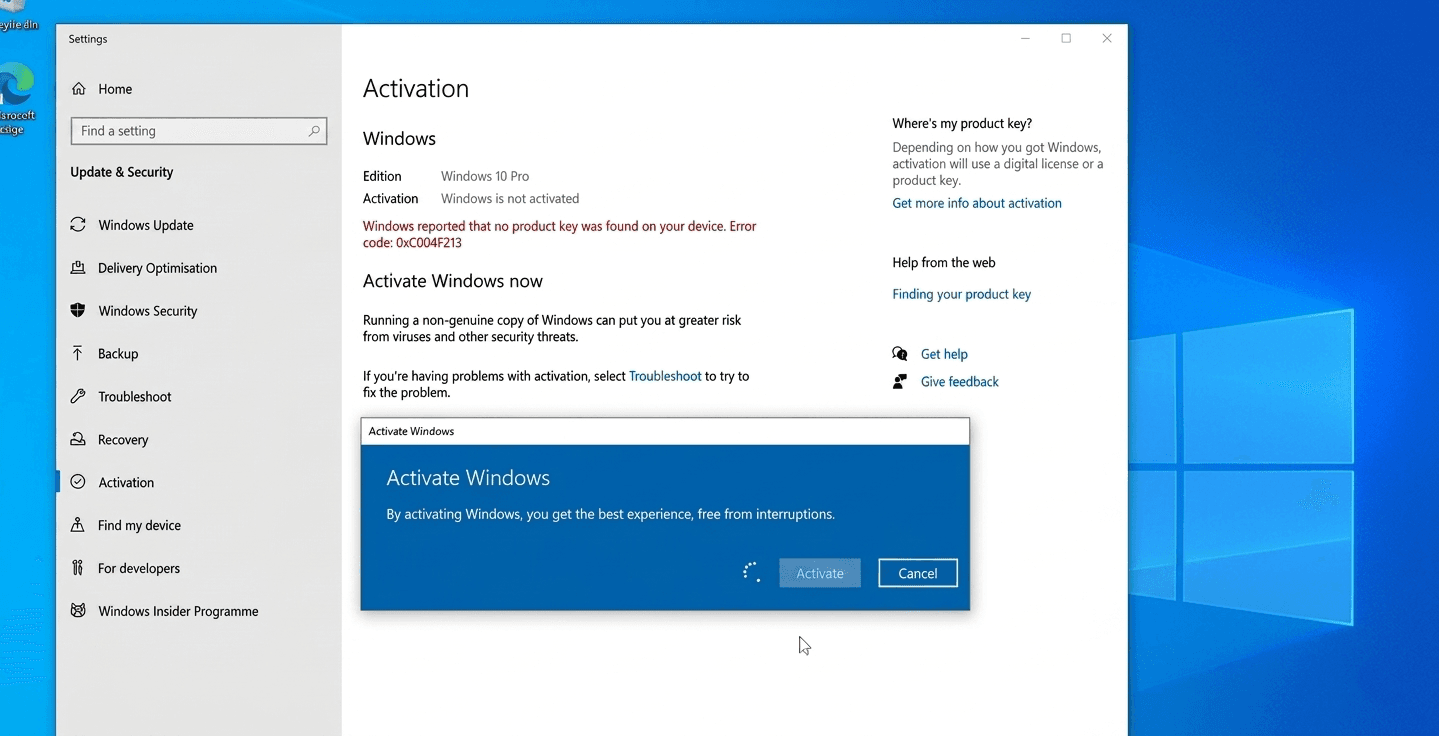
Have you ever noticed that slightly transparent, annoying Activate Windows text sitting in the bottom right corner of your screen? Or maybe you are building a brand new computer and wondering what the next steps are after installing the operating system.
If you use a PC, you have probably heard about Windows Activation and Product Keys. But what do these words actually mean, and why should you care?
Let's break down everything you need to know about Windows activation in simple, easy to understand terms.
What Does Windows Activation Actually Mean?
Imagine you buy a ticket to a concert. When you get to the gate, the security guard scans your ticket to make sure it is real, hasn't been copied, and hasn't already been used by someone else.
Windows Activation works exactly like that security guard.
It is simply Microsoft’s way of verifying that your copy of Windows is genuine. When you activate Windows, Microsoft checks your software against their records to make sure it hasn't been installed on more computers than their rules allow. It is an anti piracy tool to ensure you are using a safe, official version of the software.
What Happens if You Don't Activate Windows?
You can technically use Windows 10 or Windows 11 without activating it, but there are a few big catches:
- The Watermark: You will have a permanent "Activate Windows" watermark on your screen.
- No Personalization: You will be locked out of the Personalization settings. This means you cannot change your desktop wallpaper, window colors, or themes.
- Missing Features: Some system features and future updates might be restricted.
How Do You Get a Windows Product Key? To activate Windows, you need a Product Key. This is a special 25 character code that looks like this: XXXXX-XXXXX-XXXXX-XXXXX-XXXXX.
Here are the safest and best ways to get one:
1. Buy Directly from Microsoft The easiest and safest way to get a key is straight from the official Microsoft Store online. Once you buy it, they will email the key directly to you.
2. Buy a Pre-Built PC or Laptop If you buy a brand new laptop or a ready-made desktop PC from brands like Dell, HP, or Lenovo, you usually don't need to buy a key. The computer manufacturer already paid for it, and the key is permanently embedded in the computer's motherboard. When you turn it on and connect to the internet, it activates automatically!
3. Authorized Retailers You can buy boxed copies or digital codes from trusted sellers like Amazon or Best Buy.
- A Quick Warning: If you search online, you will see websites selling Windows keys for $5 or $10. Be very careful! These are often grey market keys meant for businesses or schools, not individual users. Sometimes they work for a few months and then suddenly stop, leaving you right back where you started.
How to Activate Windows (Step-by-Step) Once you have your key, activating your system is incredibly easy. Just follow these steps:
- Click on the Start Button and open your Settings (the gear icon).
- Go to System.
- Scroll down and click on Activation (In Windows 10, it's under Update & Security > Activation).
- Click on Change product key.
- Carefully type in your 25-character code and click Next.
That's it! Windows will connect to the internet, verify your code, and unlock all the features on your PC.
What is a Digital License? Nowadays, Microsoft tries to make things even easier. If you log into your PC using a Microsoft Account (like an Outlook or Hotmail email), your Windows Activation gets linked to your account. This is called a Digital License.
Why is this great? If your computer breaks and you need to completely erase and reinstall Windows, you don't even need to type the 25 character code again. You just log in with your Microsoft email, and Windows will activate itself!
Final Thoughts Activating Windows might sound technical, but it is just a simple verification process. By getting a legitimate key and activating your system, you get rid of that annoying watermark, unlock all customization features, and make sure your computer gets all the latest security updates straight from Microsoft.
Test Your Knowledge!
Click the button below to generate an AI-powered quiz based on this article.
Did you enjoy this article?
Show your appreciation by giving it a like!
Conversation (0)
Cite This Article
Generating...